SmartCAM Version 19.0
SmartCAM Version 19.0
SmartCAMcnc has announced the release of SmartCAM V19.0.
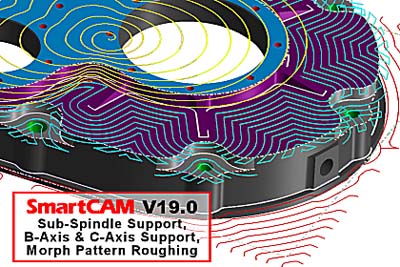
SmartCAMcnc has announced the release of SmartCAM V19.0. Version 19.0 delivers new and improved milling functionality to the SmartCAM milling suite, and several modeling and usability enhancements to the entire SmartCAM suite of computer-aided manufacturing (CAM) system software. The SmartCAM product family consists of applications for Computer-Numerical Control (CNC) milling, turning, fabrication and wire EDM.
SmartCAM Version 19.0 was conceived on three central themes: core milling improvements, core modeling improvements, and usability improvements requested by current SmartCAM customers.
The Region Roughing process introduced in SmartCAM V18 has been extended to offer a new Part Offset Roughing Pattern strategy. This new roughing method generates multiple offset profiling passes on any region configuration, including open or closed regions, with or without islands or voids. Roughing passes always progress from open stock boundaries or closed region centers toward the part profile. The resulting toolpath maintains the specified cut direction relative both the material and the part profile.
In addition to the new Part Offset roughing pattern, Version 19.0 extends the existing Spiral roughing pattern in all the roughing processes to include a new Spiral Stay-Down Roughing Option. When enabled, the stay-down behavior navigates from one "pinched off" region to another without retracting the tool and re-entering into stock. The resulting toolpath typically contains just one initial ramp to depth with the tool remaining at the cut level for the entire region, eliminating multiple retract and re-entry moves that would otherwise occur.
"For SmartCAM V19.0, we continued our development focus on the roughing improvements found in several of the recent SmartCAM releases. The new Part-Offset Pattern and Stay-Down Spiral Option allow far more efficient toolpaths to be automatically generated," said Douglas Oliver, SmartCAMcnc's Senior Product Manager. "Not only does this reduce programming and machining times, but tool life also will be greatly extended."
Several New Modeling Capabilities have been added to the SmartCAM v19 release. A new User Region function allows wireframe machining regions to be defined using any combination of part and stock profiles. User-defined region sets can then be passed to the Region Rough process for efficient machining using the captured part and stock definition.
The SmartCAM FreeForm Machining milling application receives a new Boundary Surface creation method that allows model voids or holes to be easily covered to exclude them during solid and surface machining processes. The Model Checking and Healing functionality is now available in all SmartCAM applications when opening or merging CAD models, and a new Model Validation tool has been added to improve access to the healing and reporting functionality.