Workflow Toolpath Application
Workflow Toolpath Application
A new application in the Edgecam software from Vero USA has been specifically designed for manufacturers to reduce costs, improve quality and hit shorter lead times.
A new application in the Edgecam software from Vero USA has been specifically designed for manufacturers to reduce costs, improve quality and hit shorter lead times. Known as Workflow, operators will be able to apply toolpaths within seconds. Workflow understands the component topology and therefore understands required manufacturing environment.
Workflow tools aid in loading and positioning the component, choosing the manufacturing method and suitable machine tools, adding user defined stock or stock from a database, importing fixtures, selecting a machine and toolkit, and managing strategies to automate manufacture. At each stage Workflow takes decisions or makes suggestions as to how the goal is best achieved. However, the user can easily over-ride the decisions if required making the whole process flexible.
What each stage does:
File: Adopting the common Microsoft Office 2010 theme, this area allows users to efficiently manage files and folders
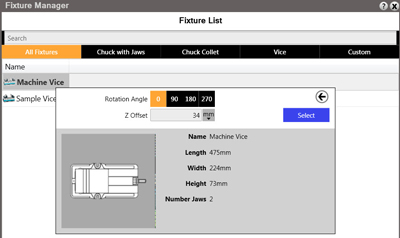
Set-Up: Dynamically sets up datum position, and adds stock and fixtures through the interactive stock, fixture and machine manager functions
Features: Using Edgecam's automatic feature recognition, many types of manufacturing features can be found in seconds
Machining: Planning board applies a suggested order to manufacture, manipulated easily by drag and drop
NC Code: The toolpath is verified in the full machine simulator, checking for collisions, gauges and limit over travel. The toolkit can be reviewed and edited before NC code is then generated to complete the five-stage Workflow process.
Common questions:
Loading and positioning the component? Fully automatic. Previously the user had to manually set the environment and use traditional commands to create a datum
Choosing the manufacturing method and suitable machine tools? The user is presented with a list of suitable machine tools based on the component's geometry, ensuring machine limits are respected
Adding user-defined stock, or stock from a database? Based on dimensions, a selection of user defined materials are listed with three categories: Valid, Normal and Invalid, which allows suitable stock to be easily selected
Importing fixtures? The user can define fixtures, including vices, chuck and clamps which can then be applied through the fixture manager
Managing strategies to aid manufacture? Edgecam engineers have derived suggested methods of manufacture to machine the part on a feature-by-feature basis, with automatic ordering to rough all features before finishing. These methods are used as "toolpath accelerators" where users can have additional input to produce the exact toolpath required for their processes. However, it is also possible for the user to update the Strategies to match his best practise manufacturing processes, so that all manual intervention is removed.
Once each section is completed, the user moves seamlessly to the next stage, completing each process in turn, resulting in a fully programmed, fully collision-checked, part with swift and accurate CNC code generated. Workflow will have a significant impact on shortening programming time, and because it is so simple to operate, the learning curve for new users is considerably reduced. The traditional CAM commands remain available at all times, and the user can alternate between the two.
Edgecam General Manager Raf Lobato says: "Workflow was developed to address the many challenges facing manufacturing today. The driving force behind Workflow was the industry's need to reduce costs with reliable, repeatable rapid NC code generation. Customers will benefit from producing programs much faster than if they were using more conventional CAM systems, and their staff will become proficient in using Workflow, quicker. Increasing their Return on Investment."