

Automated data capture slow to sell
Despite automation's advantages, the machining industry has yet to put down the pen and paper.

Automatically collected production data is often used to determine overall equipment effectiveness.
If a relatively inexpensive product could make a process more efficient, would you buy it? That’s exactly what’s being offered by developers of systems that automate the collection of key production data. But so far, most machining operations have been unwilling to ditch the pen and paper.
Sellers of automated monitoring products make a strong case when explaining why their technology is superior to manual data collection. For one thing, manually recorded information is not timely, said Jim Finnerty, product manager at Wintriss Controls Group LLC, Acton, Massachusetts.
“Nobody likes to manually enter data, so that’s often the last thing people do when they finish a job,” he said. “Or they don’t do it at all for a while until the boss calls them out. But if there’s an issue with the (process) and the information is available in or near real time, somebody would be able to do something about it on the fly.”
In addition, manually entered data will never be as accurate as automatically collected data due to the potential for transcription errors and faulty memories that can cause inaccurate entries if the data isn’t recorded immediately.
“In my experience auditing manual data capture processes, they’re at best 40% accurate,” said Adrian Pask, vice president of international development at Vorne Industries Inc., Itasca, Illinois.
Inaccurate data entries aren’t always unintentional. Regardless of whether it’s true, some machine operators might believe that their performance will be judged by the process data collected, Finnerty said.
“If that’s their feeling and they are manually recording data, they may not include unsatisfactory information, even if it’s not their fault,” he said.
So when Wintriss Controls Group installs automated data collection systems, customers often discover they have a lot more downtime than they believed, Finnerty said. He also said they frequently find that the causes of downtime are not necessarily due to the operator.
In a best-case scenario, Pask said people charged with monitoring and recording process data may be able to spot and get a response to a machine-related issue that causes a major loss in productivity.
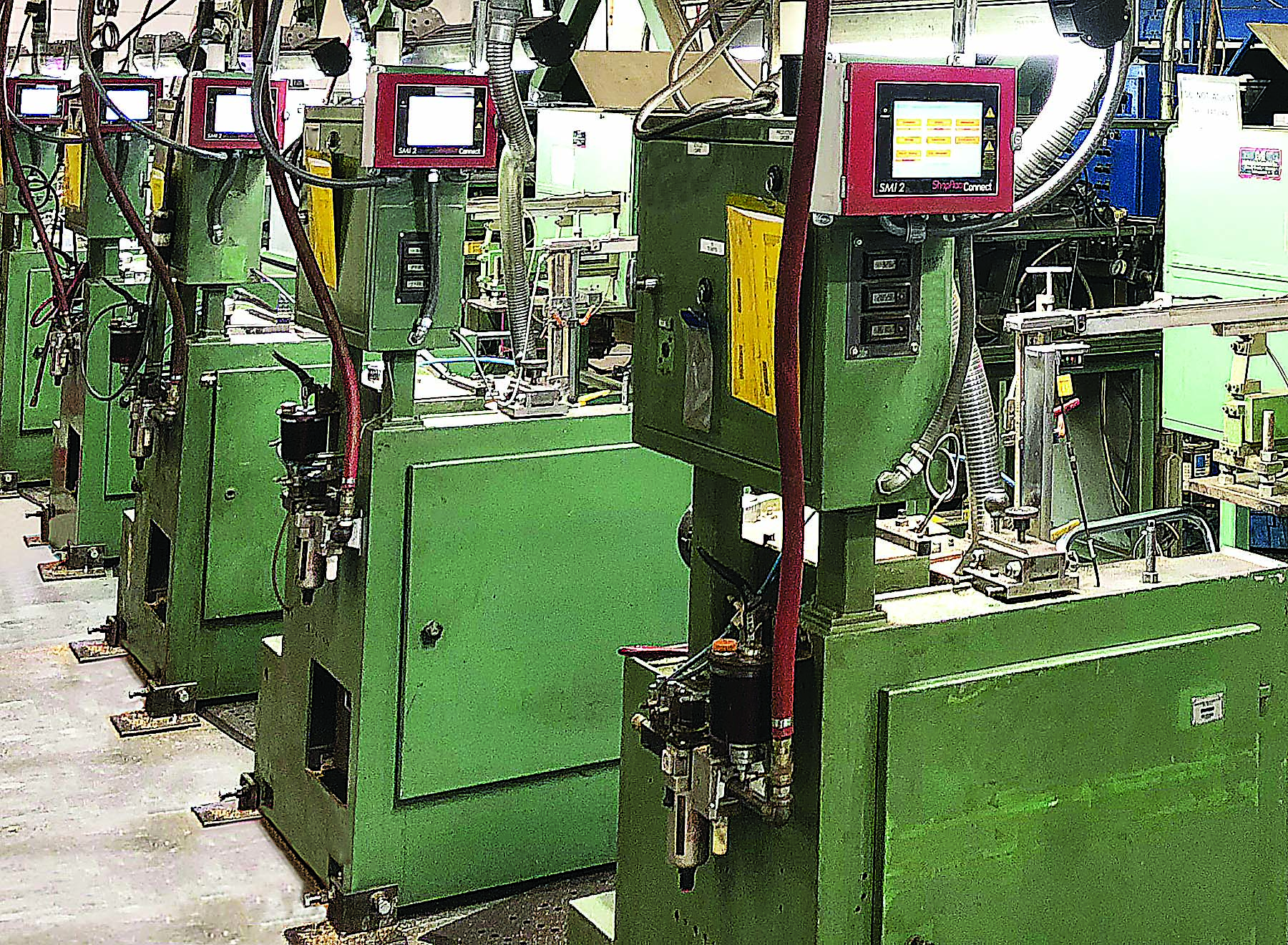
At this shop, each milling machine has a ShopFloorConnect machine interface. Image courtesy of Wintriss Controls Group
“But if you had three-minute stops that affected you a hundred times in a day, are people likely to see that?” he asked. “My contention is that if they’re not aggregating the data automatically, the answer is no.”
Automation Implementation
Some automatic data collection systems communicate directly with the machine control to get process information. Finnerty said the downside to that arrangement is that connecting the system to a machine becomes a major engineering project that can include writing code and modifying the controllers. Complicating matters further is that most machining operations employ a mix of different machines with a variety of controls, some of which may not allow connection to a data collection system.
So Wintriss Controls Group developed a data collection system called ShopFloorConnect that includes software and a dedicated machine interface, which Finnerty describes as a data collection device. ShopFloorConnect has a small color touch screen that can connect to any machine. To do its job, the device needs just a couple of simple signals from a machine: one that tells it when the machine is running and not running and another that tells it when the machine has completed a part or cycle. With those two inputs, the device can automatically collect production counts and other data related to efficiency.
In addition to the machine connection, the device connects to a server via an existing wired or wireless network. The server collects production data and makes it available in real time to a web browser or another interface. Flat-screen displays showing the collected data can be placed around the plant or on each machine. The data also goes into a database so it’s available for the creation of reports and tables.
If a machine is down, a menu designed by the user pops up on the touch screen and the operator can select a reason why the machine isn’t running. Users can require operators to do this by enabling an additional feature that inhibits machine operation until a selection is made. The device can also scan employee badges so it can identify who was running a machine at a given time.
When the operator selects a reason for downtime, the system can automatically send text or email alerts to appropriate individuals. Automatic alerts can also be sent at other points in the process—for example, at the beginning or end of a job or when a certain part count is reached.
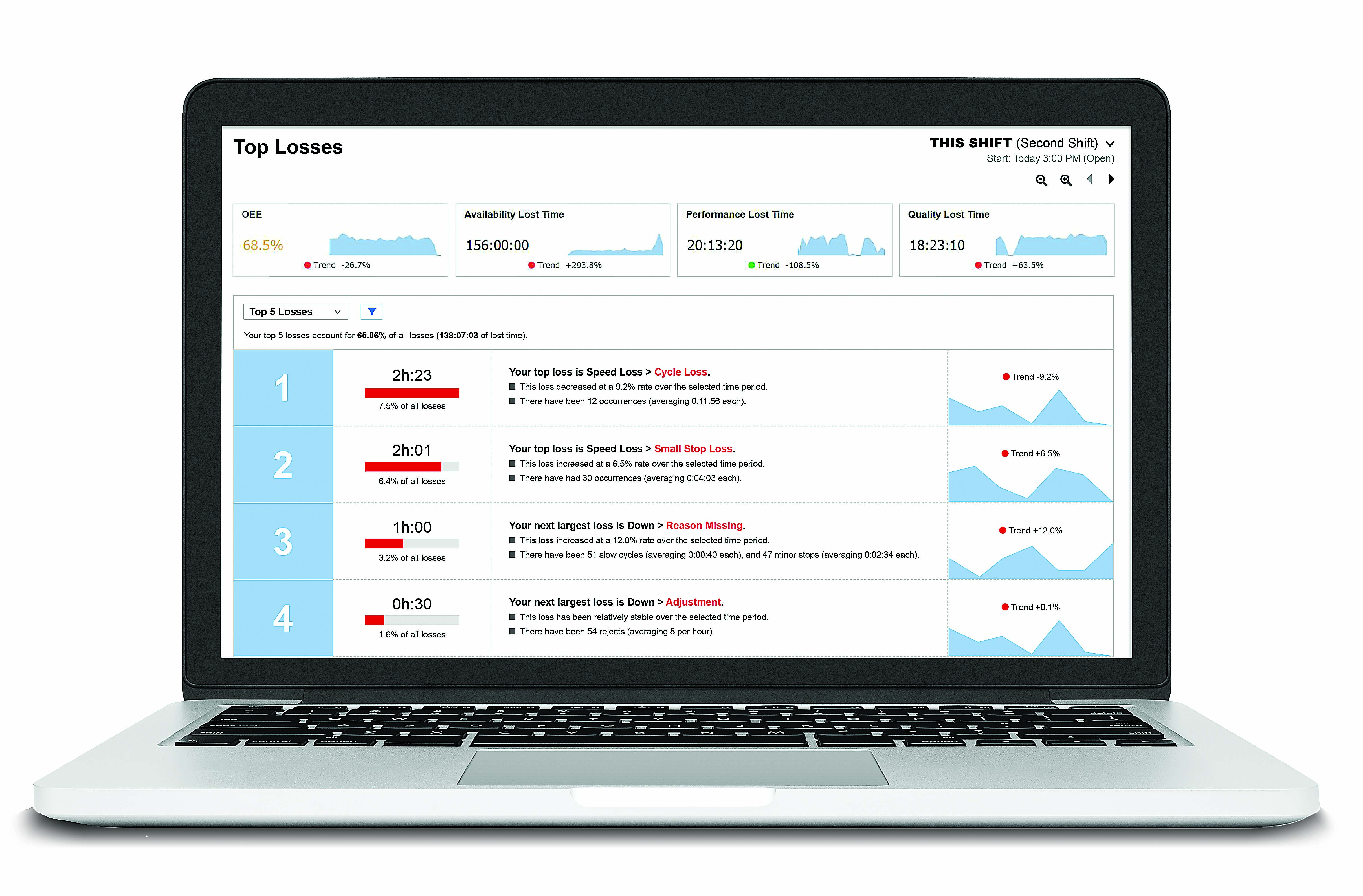
The XL Productivity Appliance tracks top losses, the main reason for reduced productivity. Image courtesy of Vorne Industries
As is the case with ShopFloorConnect, Vorne Industries’ XL Productivity Appliance doesn’t normally require the installation of sensors.
Instead, “we look for an existing sensor or relay that can give us an electrical pulse every time the machine cycles or makes a part,” Pask said.
Review the print ads from this magazine to continue
This quick advertiser review unlocks the rest of the article and keeps the full-screen reader focused on the ads instead of the page chrome.
Advertisers included in this article experience
Print placements connected to this article
- Advanced technical support available
Take control of your deep hole drilling
Star SU offers stocked carbide tip and solid carbide single flute gundrills - 24-hour delivery, stock sizes from Ø.039” to Ø.750” - 72-hour custom delivery, stock sizes from Ø.0937” to Ø1.508” - Solid carbide twist drills available 30x Ø or to custom lengths - Solid carbide gundrills: standard and custom designs available.
Take control of your deep hole drilling Star SU offers stocked carbide tip and solid carbide single flute gundrills - 24-hour delivery, stock sizes from Ø.039” to Ø.750” - 72-hour custom delivery, stock sizes from Ø.0937” to Ø1.508” - Solid carbide twist drills available 30x Ø or to custom lengths - Solid carbide gundrills: standard and custom designs available - Two fluted gundrills: milled flutes or double crimp - Retipping and resharpening services - Advanced technical support available For pricing, sizes or to request a quote, give Star SU a call or visit our website:
Visit - Advanced technical support available View this placement in the issue recordPrint ads from this magazine
Star SU offers stocked carbide tip and solid carbide single flute gundrills - 24-hour delivery, stock sizes from Ø.039” to Ø.750” - 72-hour custom delivery, stock sizes from Ø.0937” to Ø1.508” - Solid carbide twist drills available 30x Ø or to custom lengths - Solid carbide gundrills: standard and custom designs available.
Take control of your deep hole drilling Star SU offers stocked carbide tip and solid carbide single flute gundrills - 24-hour delivery, stock sizes from Ø.039” to Ø.750” - 72-hour custom delivery, stock sizes from Ø.0937” to Ø1.508” - Solid carbide twist drills available 30x Ø or to custom lengths - Solid carbide gundrills: standard and custom designs available - Two fluted gundrills: milled flutes or double crimp - Retipping and resharpening services - Advanced technical support available For pricing, sizes or to request a quote, give Star SU a call or visit our website:
Continue reading
June 2019
XL counts these pulses to determine the number of machine cycles in a certain period of time. The device also measures the time between pulses and compares these two pieces of information with the user’s production standards to determine how well the process is running.
Automatically collected production data is often used to determine overall equipment effectiveness, the percentage of manufacturing time that is productive. OEE can be calculated by multiplying numbers representing three factors: quality, performance and availability. An OEE score of 100% means that a manufacturer is making only good parts (100% quality) as fast as possible (100% performance) with no process stop time (100% availability).
ShopFloorConnect automatically collects the data necessary to determine quality and availability. Performance, however, is entirely dependent on the part, Finnerty said. Therefore, a separate ideal production rate for each part is entered into the system. During the production of a particular part, the system applies the appropriate ideal production rate to the machine.
“This lets us calculate a very accurate version of OEE regardless of what the machine is doing and how long it does it,” he said.
New and Next
Automated data collection technology is not new, but there have been recent developments. Vorne Industries, for example, is using the cloud to distribute updates to its XL software.
Another firm, Memex Inc., Burlington, Ontario, is adding pattern matching to its Merlin Tempus data collection software.
“Since we are tracking everything, we can spot certain patterns before the operational management team sees them,” said President and CEO David McPhail. “Then alerts are automatically sent to people who need to know that certain things are happening.”
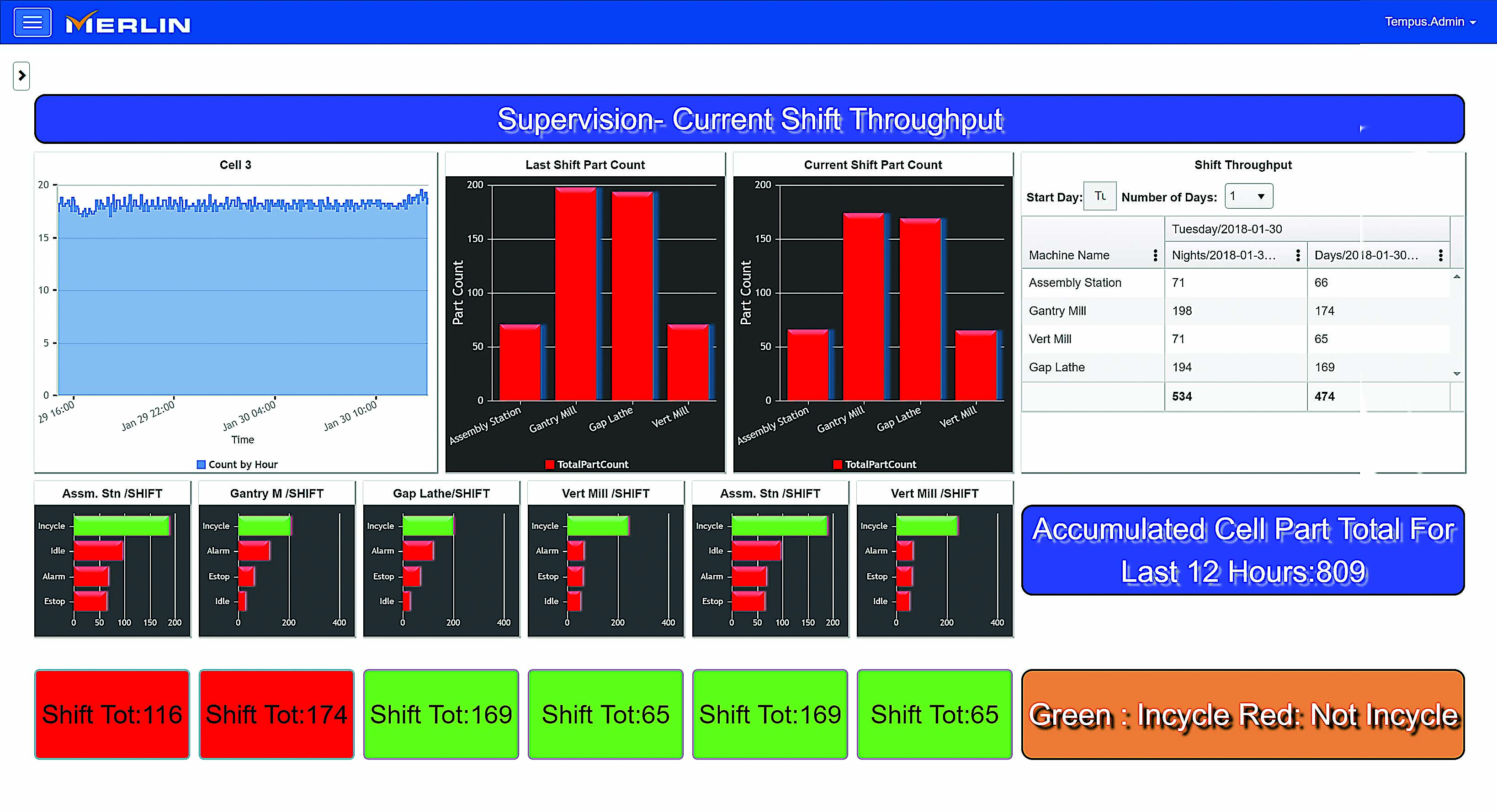
Merlin Tempus software shows night shift throughput. Image courtesy of Memex
These could inform shop personnel about tool breakage, for example, or a machine that’s not running at the specified performance rate.
McPhail said the next frontier in the development of automatic data-gathering software is to marry the power of artificial intelligence with the information being collected.
“That will allow our products to predict certain scenarios in which performance will not be what it should be and then recommend to operators and management teams what should be done about it,” he said.
Uncommon in Machining
Although Memex’s product has been on the market for more than 11 years, McPhail estimates that at least 95% of machining companies haven’t automated their data collection processes. Pask and Finnerty also report a lack of enthusiasm for automated data collection products in the machining community as a whole.
Pask believes that many machine shops conclude they won’t benefit enough from the technology because of the nature of their work. The focus on material costs tends to be greater than the focus on time in low-volume, high-mix environments, he said.
“If you are making a single piece and it takes nine hours,” he said, “the value of that piece has much more to do with materials and material loss than (production) time.”
As for machining operations that could benefit greatly from increased production efficiency, Finnerty insists they’re not being put off by the cost of automated data collection. He said the price tag for a typical 20-machine ShopFloorConnect package is under $60,000, not including installation costs, and the return on investment can be as soon as six weeks.
Rather than not having the budget for automated data gathering, he believes that many machining firms might be holding back because of implementation considerations.
“The entire plant should support and implement it,” Finnerty said. In particular, “the operators need to learn a different interface, and they have to be assured that this isn’t being put in to be Big Brother. On the contrary, ShopFloorConnect is very easy to install and can be up and running within two weeks.”
McPhail, who puts the payback period for his company’s technology at four months on average, said one of the biggest impediments to adoption is that many manufacturers wrongly believe they are already efficient. While a world-class OEE score is about 85% (0.95 for quality × 0.95 for performance × 0.95 for availability × 100), most manufacturers using manual data collection methods are actually at 35% to 40%, he said.
“But they think they’re much better because they don’t have any data to prove otherwise,” he said. “So there is a huge disconnect between perception and reality.”
Related
Subscribers can use MFGAxis notes, saves and discussion tools with their innoNET account.