

The CAD/CAM user experience
CAD/CAM software developers are no longer competing only with each other. They are also competing with their customers' expectations of what a satisfying user experience (UX) should be.
CAD/CAM software developers are no longer competing only with each other. They are also competing with their customers’ expectations of what a satisfying user experience (UX) should be.
The bar has been set high because customers, particularly those in their 20s and 30s, have a lot of experience with electronic devices, apps and the external services that those apps routinely access. As a result, CAD/CAM users often develop a “visceral radar” that provides near-instant feedback regarding whether or not their interaction with the latest version of a digital product, like CAD/CAM software, is working for them.
At first glance, UX seems like a refurbished acronym for a worn-out concept—user interface. Who hasn’t, at one time or another, fallen for the snazzy UI ploy? A software product that presents well can initially charm, but then you discover there is little depth beneath its glittering surface. UX goes much deeper than that. CAD/CAM UX designers, for instance, explore the myriad ways in which users interact with the software so every aspect of that experience can be refined to make the product easier to use.
For example, a full-featured CAD/CAM program like Mastercam from CNC Software Inc. can have more than 800 separate functions, each with its own name and icon. Whatever the challenge, there is likely to be a function in the CAD/CAM toolbox that can assist and make the job easier. On the other hand, accessing a particular function from such an expansive tool set can be like searching for a needle in a haystack. Busy machinists and CNC programmers may not be willing to spend time hunting for and learning how to use a new software feature. They may find it far less frustrating and time-consuming to employ a more cumbersome, conventional workaround. This is unfortunate, because many of those yet-to-be discovered features provide substantial productivity gains and material cost savings.
A CAD/CAM UX designer’s job is to determine which features users require routinely and put them at their fingertips, while making it easy to identify and activate features that are needed less frequently but also boost precision and productivity when they are called for. UX designers work collaboratively with customers, software developers and resellers so that the CAD/CAM software technology is coordinated, not only with the CNC machinery, but also with empirically determined human factors.
UX designers use a range of scientific tools to understand the work flow patterns of users. These include one-on-one user-observational studies, focus groups and real-time feedback of the work flow habits using permission-based software agents that report what end users are doing with the software on a click-by-click basis. Effective UX designs are not based on assumptions, but rather on hard-won knowledge.

Review the print ads from this magazine to continue
This quick advertiser review unlocks the rest of the article and keeps the full-screen reader focused on the ads instead of the page chrome.
Advertisers included in this article experience
Print placements connected to this article
Morsecuttingtools
Morse Cutting Tools®
NEW 2016 Catalog Featuring Hundreds of NEW Cutting Tools for High Performance & Production Machining. REQUEST YOUR FREE COPY TODAY using the Literature Request Form at or phone us at Also available for DOWNLOAD as a PDF File 31695 Stephenson Hwy. RECEIVE IT FAST Madison Heights, Michigan 48071 NOW SHIPPING FROM Bensenville, IL.
NEW Morse Cutting Tools® 2016 Catalog Featuring Hundreds of NEW Cutting Tools for High Performance & Production Machining. REQUEST YOUR FREE COPY TODAY using the
Visit Morsecuttingtools View this placement in the issue recordolder machines on your floor with Mastercam’s Dynamic
OUR TOOLPATHS
SAVE TOOLS DYNAMIC MOTION TOOLPATHS EVENLY DISTRIBUTE HEAT AND PRESSURE. Dramatically extend the life of tools and give new life to toolpaths. Milling even tough materials like titanium and Inconel is faster and smoother the Dynamic way. Save tools. Save time. Save money. Use Mastercam Dynamic toolpaths. NEW CuttingToolsEngineering-FullPage.idml 1 6/9/15 2:44 PM.
OUR TOOLPATHS SAVE TOOLS DYNAMIC MOTION TOOLPATHS EVENLY DISTRIBUTE HEAT AND PRESSURE. Dramatically extend the life of tools and give new life to older machines on your floor with Mastercam’s Dynamic toolpaths. Milling even tough materials like titanium and Inconel is faster and smoother the Dynamic way. Save tools. Save time. Save money. Use Mastercam Dynamic toolpaths. NEW
Visit older machines on your floor with Mastercam’s Dynamic View this placement in the issue recordPrint ads from this magazine
NEW 2016 Catalog Featuring Hundreds of NEW Cutting Tools for High Performance & Production Machining. REQUEST YOUR FREE COPY TODAY using the Literature Request Form at or phone us at Also available for DOWNLOAD as a PDF File 31695 Stephenson Hwy. RECEIVE IT FAST Madison Heights, Michigan 48071 NOW SHIPPING FROM Bensenville, IL.
NEW Morse Cutting Tools® 2016 Catalog Featuring Hundreds of NEW Cutting Tools for High Performance & Production Machining. REQUEST YOUR FREE COPY TODAY using the
Continue reading
January 2016
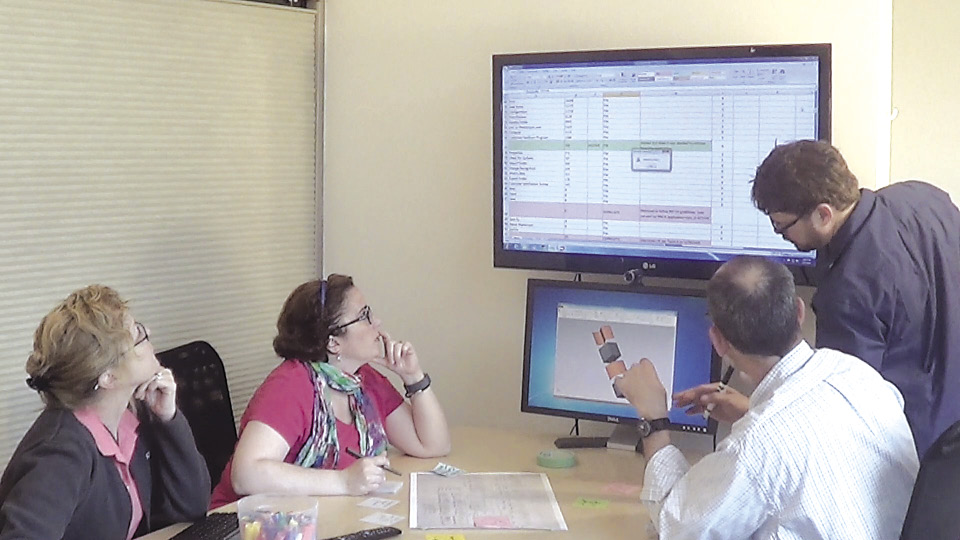
When testing Mastercam 2017 usability, volunteers, usually resellers and customers, receive access to the prototype version and are instructed to use thinking-out-loud techniques to convey their thoughts as they work through the new design. The software developer also collects their feedback through standard surveys. The UX team uses the research to create a list of key issues that people experience during their sessions, rates them based on severity and proposes recommendations to improve the design. Image courtesy CNC Software.
Some of the things UX designers are discovering are simple and practical, such as how to use colors that won’t put the color-blind at a disadvantage or how to eliminate the need for auditory feedback in noisy shop environments where CAD/CAM software is increasingly being used. In addition, UX designers apply customer feedback to design families of icons that telegraph their underlying functionality and take geographic differences into account. Icon designs that are obvious to someone in Oklahoma may be confusing to a CAD/CAM user in Okinawa.
UX designers are also well aware that over the next decade, perhaps sooner, nearly an entire generation of CAD/CAM users will give way to a CNC machining workforce that never knew what life was like without smartphones and computers. Designers are already researching ways that the software itself can facilitate the education, assimilation and career growth of this new workforce.
Is UX design something that just software developers need to think about? Should users just sit back and take a wait-and-see approach to what software developers eventually create? No, because there is too much at stake for end users to stay in the background. CAD/CAM software developers are looking out 5 to 10 years and beyond to integrate their emerging CAD/CAM technologies with visionary UX designs.
Users should be looking for opportunities to collaborate with these developers, speaking up about their needs and visions for the future. At the very least, those engaged in CNC machining should peer over CAD/CAM UX designers’ shoulders. This will help the user transform what designers currently are working on into a competitive advantage in the future.
Related
Subscribers can use MFGAxis notes, saves and discussion tools with their innoNET account.