

More tips for operating a CNC lathe
Shop Operations Columnist Tom Lipton offers additional tips for operating a CNC lathe in the February 2014 issue of Cutting Tool Engineering magazine.
Following the theme of last month’s column, here are some additional tips and tricks for operating a CNC lathe.

All images courtesy T. Lipton
Using a turning tool, scratch a line a tenth or two deep along the turret axis. It allows you to twist a boring bar around and have something for lining up the cutting edge.
■ Try turning off the constant cutting speed when turning tricky plastics. Having manual control over the cutting speed can provide better control of the stringy chips. Chip control in a CNC lathe can be a real roadblock to unattended machining on some types of plastics. You can increase the chip load by slowing the spindle or increasing the feed rate to thicken the chip. Even a simple task like turning off the coolant can sometimes help with chip control.
■ Setting the fine serration top jaws in a CNC lathe power chuck is a common challenge. The 1mm serrations make it easy to set one tooth off and screw up the centering on a blank. Also, it’s difficult to measure three jaws and set them to the middle of the jaw travel. I made special labels that have the basic sizes engraved on them so I can quickly set the jaws to a diameter range and hit all the serrations at the same radius. It cost $5 and a little time to engrave on a mill. Be sure to thoroughly clean the part of the jaws where these labels stick on. Make it a habit to remove the fine jaw serrations from the jaw with a scratch brush when reinstalling the top jaws.
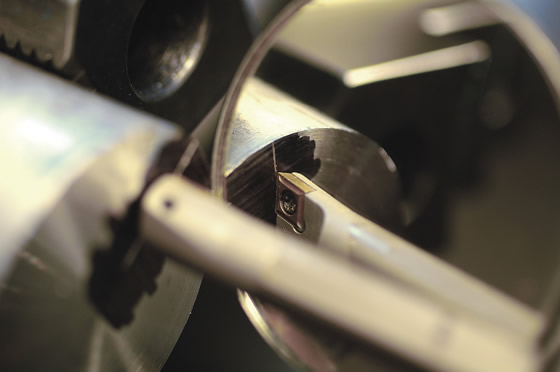
Use a mirror to see a workpiece upside down to align a tool with the scribed centerline.
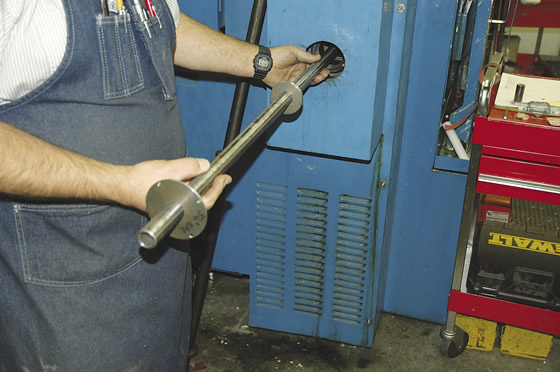
For bar pulling operations, it’s better to have a spindle liner that is close to your raw stock size. Pictured is a simple spindle liner.
Review the print ads from this magazine to continue
This quick advertiser review unlocks the rest of the article and keeps the full-screen reader focused on the ads instead of the page chrome.
Advertisers included in this article experience
Print placements connected to this article
Iscar
Intelligently wave-shaped cutting edge guarantees reduced vibrations
Iscar promotes a wave-shaped cutting edge designed to reduce vibration and improve chip control in difficult materials.
Intelligently wave-shaped cutting edge guarantees reduced vibrations Iscar promotes a wave-shaped cutting edge designed to reduce vibration and improve chip control in difficult materials. Visit iscarmetals.com to learn more.
Visit Iscar View this placement in the issue recordPrint ads from this magazine
Iscar promotes a wave-shaped cutting edge designed to reduce vibration and improve chip control in difficult materials.
Intelligently wave-shaped cutting edge guarantees reduced vibrations Iscar promotes a wave-shaped cutting edge designed to reduce vibration and improve chip control in difficult materials. Visit iscarmetals.com to learn more.
Continue reading
February 2014
■ Sometimes it’s hard to align a boring bar with the machine axis and centerline when the manufacturer doesn’t provide flats on a tool. To get around this problem, I face the end of a setup bar and darken it with a marker. Using a turning tool, I scratch a line a tenth or two deep along the turret axis. This line is pretty accurately on center and aligned with the turret X-axis angle. It allows me to twist the little boring bar around and have something for lining up the cutting edge. I use a mirror so I can see upside down to align the tool with the scribed centerline.
■ Once you have set up and used a tool, do yourself a favor: When you remove it from the lathe, record at least the X-axis offset on the storage tube or directly on the tool. This will speed the setup of that tool the next time you use it. The offset won’t be perfect, but it can be darn close.
■ For all my external boring tools, I add a back stop screw that butts against the turret. This allows me to retain an accurate X offset if I take the holder out of the machine. During the next setup of that tool, I retain the X offset.
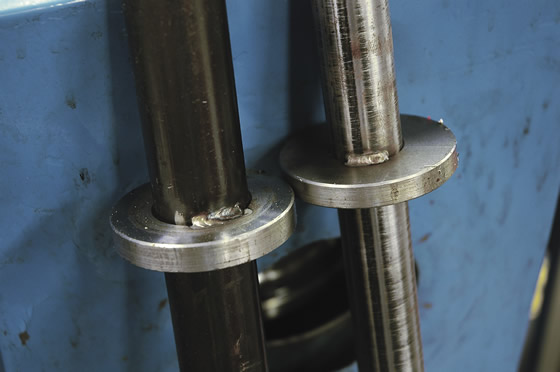
A few welds puts the finishing touch on an inexpensive spindle liner.
■ If you have enough machine X-axis travel and the control will allow it, you can run the spindle in reverse and take a light test cut on the OD of a part with an internal tool to set an accurate X offset without having to make and measure a bore. On my machine, I enter the offset as a negative X value because the tool is into the negative X quadrant. Be sure to check the control to see if it will accept a negative value and still correctly do the offset math. It’s almost always easier to accurately measure an OD than a bore or hole.
■ For bar pulling operations, it’s better to have a spindle liner that is close to your raw stock size. I made single spindle liners that drop into the headstock. They use common off-the-shelf pipe and tubing sizes. Have the waterjet or laser cutter zip out a bunch of disc blanks next time you have less than a minimum cutting order. Toss them on the shelf, and the next time you need a special liner diameter, half the work is already done. Chop off a piece of tube and weld the discs in place. A couple of quick welds and you have an inexpensive spindle liner for that oddball size you need to run. CTE
About the Author: Tom Lipton is a career metalworker who has worked at various job shops that produce parts for the consumer product development, laboratory equipment, medical services and custom machinery design industries. He has received six U.S. patents and lives in Alamo, Calif. For more information, visit his blog at oxtool.blogspot.com and video channel at www.youtube.com/user/oxtoolco. Lipton’s column is adapted from information in his book “Metalworking Sink or Swim: Tips and Tricks for Machinists, Welders, and Fabricators,” published by Industrial Press Inc., South Norwalk, Conn. The publisher can be reached by calling (888) 528-7852 or visiting www.industrialpress.com. By indicating the code CTE-2014 when ordering, CTE readers will receive a 20 percent discount off the book’s list price of $44.95.
Glossary terms in this article
QR codes and videos from this issue
Print QR codes, video callouts, and in-magazine links for this article now point to the CTE video hub in the HTML version.
Related



Subscribers can use MFGAxis notes, saves and discussion tools with their InnoNet account.