


CNC training begins with changing tools
Shop Operations columnist James A. Harvey underscores the importance of his initial CNC training, which involved changing tools on a new mill. Just the act of changing a tool let him interact with the machine and controller in a way that gave him confidence.
I started my CNC training changing tools on a new mill. That first step was important. Just the act of changing a tool let me interact with the machine and controller in a way that gave me confidence and let me know that the machine wasn’t out to get me. In a weird way, the machine didn’t seem to know or care that I was a rank beginner.
I knew right away I was going to like the relationship. The movement of the table, spindle and toolchanger, combined with the processing power of the controller, was enticing. I wanted to learn more.
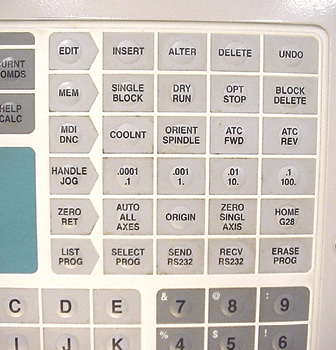
The MDI, ATC FWD and ATC REV buttons help when changing tools. Image courtesy of J. Harvey.
One of the first programs I concocted was for drilling on that machine. Once the program was running and started drilling holes, I thought, “We have a winner here! If nothing else, this machine is a drilling maniac.” I was surprised at how easy it was to change feeds and speeds, as well as how quickly the machine components moved to different
locations.
I was also surprised by how uncomplicated the machine was to set up. There are just a few things a machine needs to know before it can run a program, such as where the starting point, or origin, of the part is—just like on a conventional mill.
Not everything about operating a CNC machine is uncomplicated, though. For example, one time when our shop got some new machines, our lead man got stuck on the step that involves pressing the power-on button, waiting for the controller to boot up and then pressing the power-up/restart button. He didn’t know he had to press the power-up/restart button after pressing power on. Therefore, he couldn’t get the machine to do anything. The sad thing is, because of his initial disappointment or lack of ambition, he never touched the machine again.
When you press the power-up/restart button, the machine will run through a short routine to calibrate itself. Once everything stops moving, you can proceed.
When executing tool changes, MDI (manual data input) is the only mode that allows you to manually change tools. When you press the MDI button, the MDI screen appears. You don’t have to enter anything in this screen to make manual tool changes.
Pressing the ATC FWD button in MDI cycles the automatic toolchanger forward. In turn, pressing the ATC REV button cycles the ATC backward. You don’t need any toolholders in the machine to use these features. Cycle the tool change a few times, until you get used to the action and noise. Always keep your hands out of the machine when cycling the toolchanger.
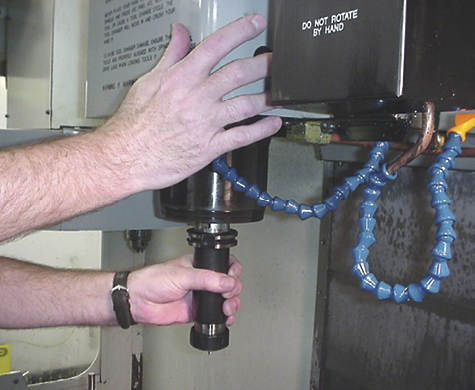
Line up the spindle lugs when installing a tool manually. Image courtesy of J. Harvey.
Type “T1” (or any tool number) with the controller keys. Then press either the ATC FWD or ATC REV button. The tool carousel will cycle T1 into position, and the actuating arm will install that tool in the spindle if it is in the carousel. The machine doesn’t know if a toolholder is in the carousel or not. If T1 is not in the carousel, you can manually install one.
When inserting a toolholder in the spindle manually, it’s important to line up the spindle lugs with the slots in the toolholder as you press the tool release/engage button on the side of the spindle housing.
When you press the PROG button, a prompt will come up in the screen asking if you want to erase the program. Press Y (yes) to get rid of the code, but don’t worry about losing any vital information. MDI mode is used primarily as a scratchboard for small and temporary programs.
You can now enter a program on the screen.
Glossary terms in this article
Related
Subscribers can use MFGAxis notes, saves and discussion tools with their innoNET account.