

Systematic thinking: Enterprise resource planning
The steel comes in late, she shop is overloaded, due dates are regularly missed and the last quote was blown because no one has a clue about actual operating costs. These are just a few of the daily problems encountered by shops that manage their businesses through Excel spreadsheets and low-cost accounting software. There is a better way.
Even small shops need an ERP system.
The steel comes in late, the shop’s overloaded, due dates are regularly missed and the last quote was blown because no one has a clue about actual operating costs. These are just a few of the daily problems encountered by shops that manage their businesses through Excel spreadsheets and low-cost accounting software. There is a better way.
Manufacturers have used MRP (Material Requirements Planning) software to manage supply and demand since the days of mainframe computers and paper punch cards. MRP compares production requirements against available inventory to make planning recommendations. The software has since evolved into an integrated, all-encompassing suite of business software known as ERP (Enterprise Resource Planning).
ERP manages everything from quoting parts to receiving cash, paying bills and ordering material. A typical ERP cycle begins by entering a customer purchase order into the system. Credit limits are verified and an order acknowledgment is returned to the customer. From there, the ERP system checks for available inventory and creates a job suggestion to make the product if needed. This triggers ERP to look for raw material, netting off available stocks and creating purchase order suggestions when materials are short. ERP also analyzes manufacturing times and recommends due dates for jobs and purchase orders accordingly.
Once the job is released to the floor, scheduling and inventory control take over. Materials are issued to the job or back-flushed from inventory, if desired. Job costs are accumulated and the schedule is constantly updated as operators clock in to jobs for setup and production operations. Some systems collect inspection information and allow for scrap or rework to be performed. When the job is completed it is sent to inventory or shipped directly to the customer. An invoice is generated, cash is collected, and the vendors and employees get paid.
For Big and Small Businesses
If you think ERP is just for enormous companies like Ford and General Electric, think again. A range of ERP systems are available, with ballpark prices from $20,000 for a handful of users to $500,000 or more—and sometimes way more—for a medium-sized, single-plant system. And, contrary to popular belief, not all ERP systems require an army of expensive consultants to implement.
Still, ERP systems are far from plug and play and the manufacturing world is filled with horror stories of failed implementations. It takes careful planning and a close look at how a business operates to make ERP work in a job shop.
The Tipping Point
At some point, many shop owners reach an “ah-ha” moment where they say, “We can’t operate like this any longer!” This is usually just after the shop foreman’s super-scheduling-spreadsheet crashes and the bar of 316 stainless needed to run a hot job has disappeared. Danna Nelson, vice president of product management at ERP service provider Aptean, Atlanta, explained that shops reach this critical mass when outdated manual methods become too cumbersome and the business can no longer accommodate additional growth.
“Historically, many smaller manufacturers manage things offline,” Nelson said. “For example, they analyze job costs by compiling questionable job cost data into a spreadsheet. Or a new order comes in and they have to go count what’s on the shelf so they know how much material to order, something that becomes very complicated when multiple jobs are vying for the same stock. It gets to a point where you don’t know what you don’t know.”
Worse, even the shop that does everything right operationally can fail due to poor data. “Say there’s a rush job where everyone pulls together to get it out on time, only to discover 2 weeks after the parts have shipped that overtime costs killed any profit margin,” Nelson said. “That’s the sort of thing that makes shops realize they need to do something.”
At that point, many of those beleaguered owners, presidents and CEOs might start calling ERP vendors. They’ll find that shop ERP systems are available that provide automated job costing, real-time shop scheduling and capacity planning. Excited that all their problems are about to be solved, they sign on the dotted line with the one that seems most impressive.
Bad idea. Buying a system without buy-in from your team is a recipe for disaster. “Everyone needs some skin in the game,” Nelson said. “But what often happens is there’s a manager’s meeting and somebody says, ‘Hey, we need to do something about the software.’ Everyone agrees, so they tell the IT guy to go select an ERP system. That’s a mistake. Without the leaders of the business involved in the selection process, it becomes someone else’s project.”
Skip the Mandate
Paul Ventura, vice president of marketing for Shoptech Software Corp., Glastonbury, Conn., agreed: “Obviously, buy-in from owners isn’t the problem. There must be a perceived need from up top or we wouldn’t be there in the first place. The real challenge is getting the middle managers and end users involved. You have to sell this to the purchasing person, the production planner and the finance folks.”
It’s not enough for the shop owner to tell everyone they’d better get on board by working more overtime, and that statement could be counterproductive. Unless your employees are like the slackers from the movie “Office Space,” everyone is already putting in 40-plus hours. Demanding they work another 20 hours a week (or more) on software implementation might lead to the captain of the ship being strung to the yardarm. A better approach is to convince the users that, in a properly implemented ERP system, their lives will become easier.
Ventura said two things—job costing and capacity planning—are the key drivers for an ERP purchase. Ironically, they’re also the most challenging to achieve. “It’s not easy. You need accurate BOMs [bills of material] and job routings as well as consistent data collection on the shop floor. Materials must be issued correctly. If you’re not used to operating like that, it can be hard work at first. Before long, though, the everyday discipline needed to make your ERP system hum becomes the normal way of life.”
High Cost of ERP
As previously noted, one of the misconceptions about ERP is that it is extremely costly. “You’ll see the ‘high cost of ERP’ everywhere on the Internet,” said Adam Grabowski, director of marketing at The Woodlands, Texas-based Global Shop Solutions Inc. “To me, it’s a misnomer. Certainly there are some very expensive systems out there and others that are either very low-cost or even pay as you go. Regardless of the investment, your ERP vendor should be able to provide a tangible ROI and lay out a plan for how your company will achieve it.”
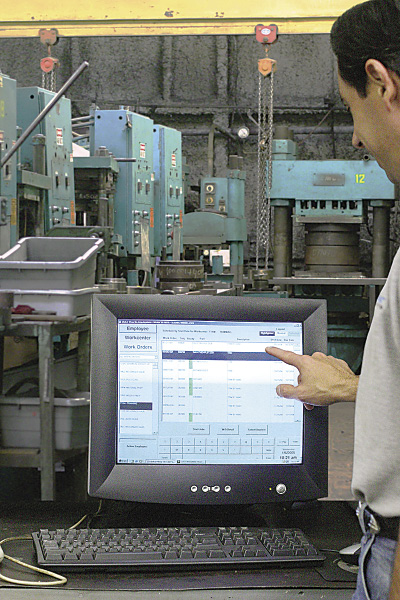
Courtesy of Global Shop Solutions
Consistent data collection on the shop floor job is one of the keys to accurate job costing and capacity planning when using ERP software.
Grabowski explained that software justification is a matter of perspective, and one shouldn’t look at ERP as just another business cost. Companies with successful implementations boast a laundry list of benefits: reduced administrative overhead, lower labor and material costs, increased productivity and superior customer service. “Bundle all this up and you deliver better quality parts, on time, every time, leading to increased sales and better margins.”
That doesn’t mean throw caution to the wind and buy every bell and whistle. A knowledgeable software vendor will help determine which features are essential. Before calling the vendor, however, interview the people in your company—talk to old Joe, the guy who sweeps the floor and takes too many smoke breaks. Talk to Mary Beth, the miracle worker who somehow gets the parts to the plater on time. Talk to Ed, the EDM operator who always manages to clock in late. Find out what’s broken and what those people think can be done to fix it. This approach may seem unorthodox, but it yields valuable insights into the inner workings of your organization. It also garners widespread acceptance of the new system, a priceless commodity in the months ahead. Remember, software isn’t a cure-all, but it is a golden opportunity to develop robust internal processes and reinvent the company.
Apples to Apples
Once this is done, prepare your needs list into must-haves, should-haves and nice-to-haves before the first salesperson arrives. Talk to other companies using those systems. Prepare demonstration scripts, so that you don’t get lost in the salesman’s descriptions of sleek functionality—focus instead on how each vendor will best address business concerns A, B and C. At all costs, avoid software customizations. As a rule, it’s better to change your business processes than it is to change the software—not only are modifications costly, but they tend to impact other parts of the system, leading to an avalanche of customizations.
Review the print ads from this magazine to continue
This quick advertiser review unlocks the rest of the article and keeps the full-screen reader focused on the ads instead of the page chrome.
Advertisers included in this article experience
Print placements connected to this article
Fax+1 817 258 3221, [email protected] www.iscarmetals.com
15,000
) Indexable Solid Carbide Endmill Options 3/13/14 2:25 PM.
) 15,000 Indexable Solid Carbide Endmill Options ISCAR METALS INC. Tel + 1 817 258 3200, Tech Tel 1-877-BY-ISCAR, Fax+1 817 258 3221, [email protected] www.iscarmetals.com 3/13/14 2:25 PM
Visit Fax+1 817 258 3221, [email protected] www.iscarmetals.com View this placement in the issue recordPrint ads from this magazine
) Indexable Solid Carbide Endmill Options 3/13/14 2:25 PM.
) 15,000 Indexable Solid Carbide Endmill Options ISCAR METALS INC. Tel + 1 817 258 3200, Tech Tel 1-877-BY-ISCAR, Fax+1 817 258 3221, [email protected] www.iscarmetals.com 3/13/14 2:25 PM
Continue reading
April 2014
After the first round of demonstrations, talk with your team. Use a scorecard to rate the vendors. Narrow the pool to the top two or three and do it all over again. Now’s the time to consider the “other costs.” ERP implementations involve far more than installing some software. Do you need a new server? Is the network fast enough? Do the desktop computers need upgrading? How about bar code scanners, shop floor terminals and label printers? It’s a computer nerd’s greatest fantasy—or his worst nightmare (see sidebar above).
Take a look at the vendor’s training and implementation tools. Adopting a new ERP system is all about people, and people need training. Grabowski suggests asking several key questions: “Is the vendor able to deliver great onsite training? What about virtual training? Are the right resources available in your shop to cover day-to-day job functions while people are in class?”
Above all, consider the impact an ERP system will have on the company. For all the potential benefits, many implementations see people running for the door, opting to leave for less tumultuous workplaces, before the first bit of data ever gets entered. Grabowski said, “Historically, we’ve found one of the reasons implementations go off track is because the project team struggles with change management. It’s critical to rally the troops and make the new ERP system part of your culture.”
Howdy, Pardner
Maybe you need a helping hand. After all, software is a different cup of tea for those who spend their days machining parts and pulling chips out of their boots. Some shops opt for a third-party consultant to help guide them through the technical morass of ERP systems. One of these guides is Shawn Windle, principal consultant at ERP Advisors Group, Greenwood Village, Colo. “Before buying an ERP system, it’s critical that shops understand their ideal future state,” Windle said. “This means a clear definition of business goals, expected growth and opportunities for cost reduction.”
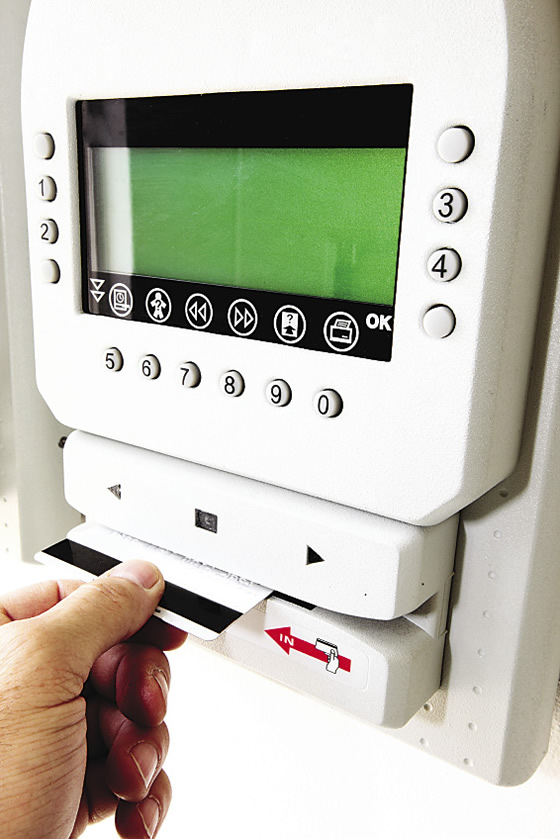
Allocating staff time to different jobs via electronic capture of time records helps an ERP system determine if jobs are profitable or not.
With substantial benefit comes substantial risk. Buy the wrong machine tool and you can always sell it. Buy the wrong ERP system and you’ll be living with it for years—as a rule, software can’t be re-sold. This potentially means scrapping the system and starting over.
“Small shops can’t afford to be wrong,” Windle said. “We once worked with a client that had around $10 million a year in revenue. They shopped around, talked to different ERP vendors and settled on a system. The salesperson assured them it was the right fit. He also sold them on the idea that they could do it themselves. He was wrong on both counts.” The unhappy customer ended up writing off $100,000 in software and implementation services and countless hours of their own time.
So do your homework. And when you’re ready to sign up, look for the part in the contract titled “implementation services” or some such verbiage. Chances are, it’s a big number, and you might be tempted to cross it off the list. Don’t do it. Going solo on an ERP implementation is more daring than skydiving and possibly more dangerous. Even if you’ve been through a previous installation, each software system has different features. It’s always prudent to get the software vendor or one of their partners involved early on and keep them in the loop.
This doesn’t have to be an overly expensive proposition. Granted, some ERP consultants charge hundreds of dollars per hour, but if you’re ready to roll up your sleeves, much of what they recommend can—and should—be done by your own people. They might require people to work long nights and weekends, but data cleanup, training, business process review and modeling are tasks that can be done with only minimal guidance, provided you keep everyone working on the project plan, document each decision and develop processes that work within the system constraints (i.e., no software customization).
ERP implementations can be challenging, but keep your chin up. Most end as successful journeys, ones that help companies rid themselves of inefficient processes, gain real-time visibility into important data and bring them closer to industry best practices. This is true for mom-and-pop job shops and large parts manufacturer alike. Don’t expect the software to solve the shop’s problems, but rather take the implementation as an opportunity to review internal processes and encourage people to adopt new ways of thinking. Love ’em or hate ’em, ERP systems are an integral part of business. It’s time to ditch the spreadsheets and boxed accounting software and get with the program. CTE
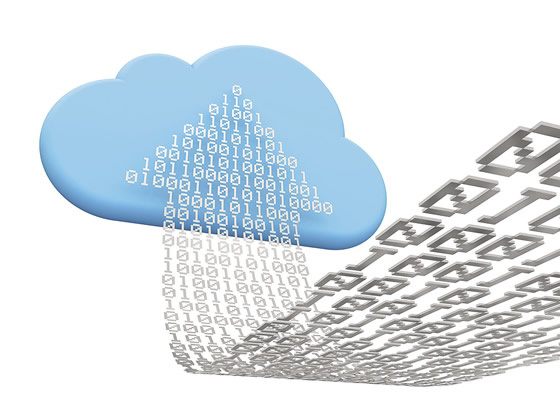
ERP with its head in the cloud
Over the past few years, cloud-based and hosted ERP systems have become increasingly popular. This means your software—and its data—sits on a server somewhere and you access it through a Web page or special client software on a desktop computer. The benefits typically include simpler implementations and lower IT costs since there’s no need to buy expensive servers or network upgrades. But do you really want an external provider holding your company’s lifeblood in its hands?
Dave Rice thinks so. As chief technical officer at TrueCloud Solutions Inc., Tempe, Ariz., a provider of cloud computing solutions and services for emerging and mid-sized business, Rice spends his days extolling the virtues of cloud-based computing. “The cloud allows for radically shortened time frames in terms of ERP delivery and implementation,” Rice said. “You can figure 90 days or less, depending upon company size, number of licenses and extent of customization.”
As a rule, shorter ERP implementations carry less cost. And because cloud-based software is generally sold on a subscription basis, shops can eat the ERP elephant one bite at a time. “Comparing total cost of ownership over the life of a product, we generally come out on top vs. on-premise solutions,” Rice said.
One additional consideration is on-premise implementation requires much larger, all-encompassing projects. “You expose much of the software’s capability during a big-bang implementation,” Rice said. “However, whatever functionality isn’t exposed during that process never gets used. Because on-premise implementation is a one-time event, companies wind up using only about 30 to 40 percent of the product.”
With the cloud, however, companies can take a more pragmatic approach, focusing on what’s needed to get going and then bringing additional functionality online later. “It allows most businesses to stay more aligned with the practical uses of the system,” Rice said. Cloud-based software users also enjoy a different kind of a relationship with their ERP vendor.
“Cloud customers are often smaller companies. They don’t have extensive IT knowledge or skill sets and don’t necessarily want them. As such, they’re willing to place a good deal of reliance on a partner,” Rice said.
That partner then becomes responsible for software and hardware upgrades, software modifications, bug fixes and so on, freeing manufacturing companies to focus on what they do best: making parts.
—K. Hanson
Contributors
Aptean
(855) 411-APTEAN
www.aptean.com
ERP Advisors Group
(866) 499-8550
www.erpadvisorsgroup.com
Global Shop Solutions Inc.
(888) 851-1248
www.globalshopsolutions.com
Shoptech Software Corp.
(800) 525-2143
www.shoptech.com
TrueCloud Solutions Inc.
(866) 990-8783
www.truecloud.com
Related



Subscribers can use MFGAxis notes, saves and discussion tools with their innoNET account.