Design Tools
Design Tools
Mastercam from CNC Software Inc. is known for powerful NC programming, but it also delivers a suite of shop-tested design tools including 3D surfacing and solids.
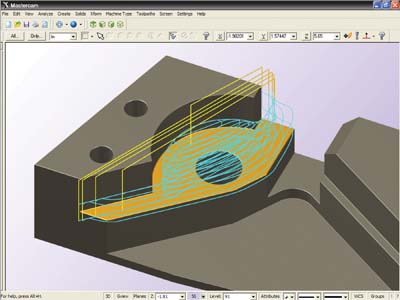
Mastercam from CNC Software Inc. is known for powerful NC programming, but it also delivers a suite of shop-tested design tools including 3D surfacing and solids. The streamlined CAD engine makes design work easier than ever before.
Mastercam Design streamlines modeling and editing geometry. It also supports advanced geometry creation, including NURBS curves and surfaces, 2D and 3D associative dimensioning, surface extension, blending, trimming, splitting, variable filleting, solid modeling, hybrid modeling, and more.
A few new enhancements to Mastercam Design X6 are:
Region Chaining — Mastercam's 2D Dynamic Milling is greatly simplified with the introduction of Region Chaining. You now define the area for a 2D dynamic milling toolpath by simply selecting the face to be machined and face to be avoided. Mastercam treats the selections (even on open pockets) as complete machining chains.
Intersecting and Trimming Solid Edges — Mastercam automatically recognizes intersections between wireframe geometry and solid edges.
Enhanced Solid Trim to Surface — New options give you even greater control over your solid/surface trim results.
Solid History Removal — Mastercam lets you strip the list of operations or features from a solid model, leaving it as a "brick" to prevent changes and protect your model. Transform (Xform) Fit Mastercam can "nest" geometry along a vector. This feature can be particularly helpful when you are fitting parts between clamps and fixtures.